

When you download a font from the web, you may see files ending in .otf or .ttf. For beginners, this can feel confusing. Which one should you install? Is one better? Will they look different? Can both be used for design work?
The simple answer is this: OTF and TTF are both font file formats. In most everyday situations, designers, students, bloggers, and small business owners can install and use either format without problems. The better choice often depends on the software you use, the files included in the download, and whether the font license allows your intended use.
This guide explains OTF vs TTF in simple language so you can choose the right file with more confidence.
What Does OTF Mean?
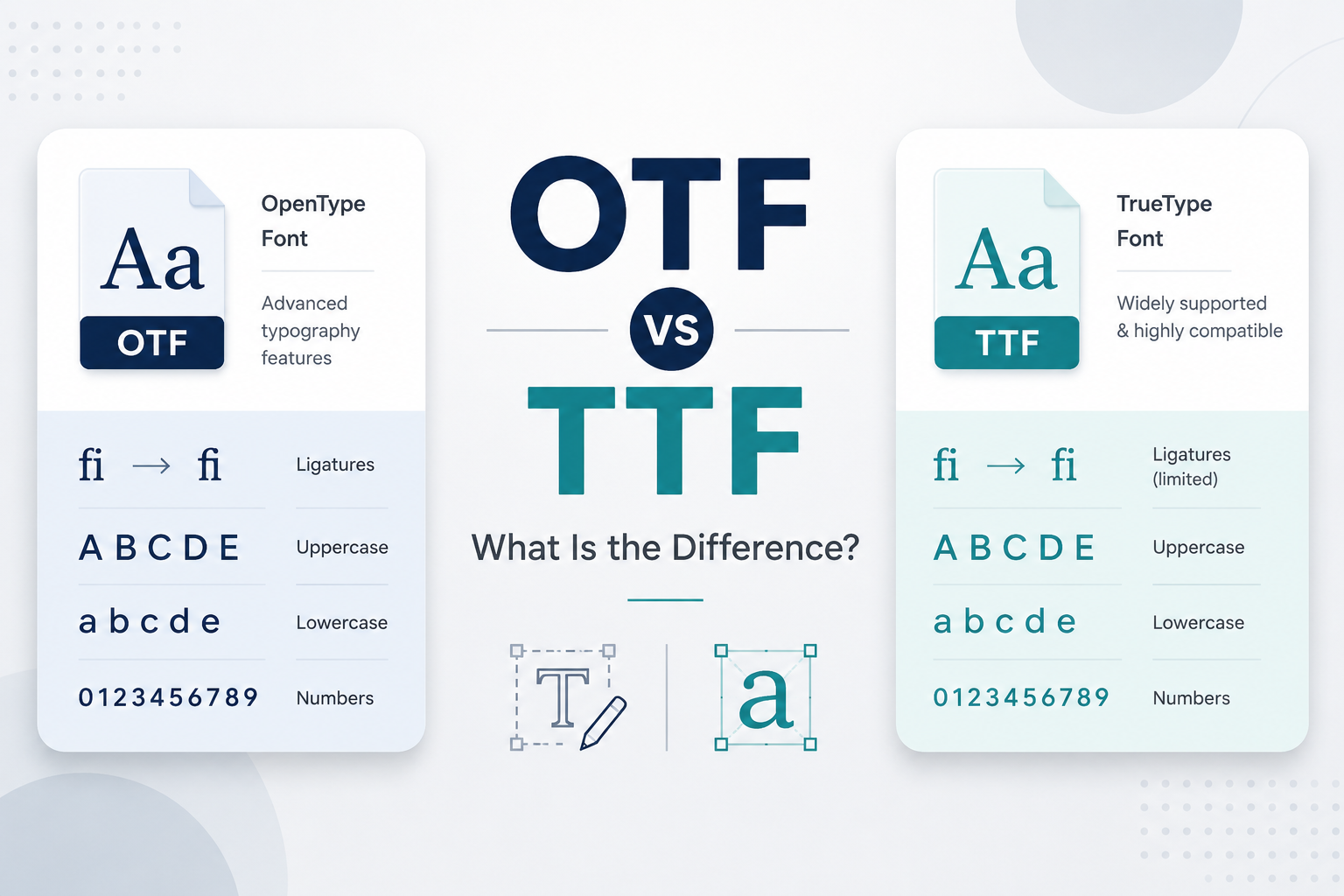
OTF stands for OpenType Font. It is a modern font format developed to support advanced typography features while working across different systems.
In practical terms, an OTF file is a font file you can install on your computer and use in many design, writing, and editing apps. Some OTF fonts may include extra typographic features, such as alternate characters, ligatures, small caps, or special glyphs. These features are especially useful in professional design software that supports them.
For example, a script font in OTF format may include decorative alternate letters. A serif font in OTF format may include more refined punctuation, number styles, or character variations. However, not every OTF font includes advanced features. The format can support them, but the actual font still depends on how the designer created it.
What Does TTF Mean?
TTF stands for TrueType Font. It is one of the most common and widely used font formats. TTF has been around for a long time and is still used today in many personal, educational, and professional projects.
A TTF file can usually be installed easily on desktop operating systems and used in common apps such as word processors, presentation tools, image editors, and design software. For many users, a TTF font works exactly as expected: install it, open your app, choose the font, and start typing.
TTF is not “bad” or automatically outdated. Many fonts are still distributed in TTF format because it is familiar, compatible, and reliable for general use.
The Main Difference Between OTF and TTF
The main difference between OTF and TTF is not usually how the font looks on the screen. It is more about the font technology and features behind the file.
OTF fonts can support more advanced typographic features, while TTF fonts are often simpler and widely compatible. But this does not mean OTF is always better, and it does not mean TTF is unusable.
If a font download includes both OTF and TTF versions, they may look exactly the same in normal typing. The letters, numbers, and punctuation may appear identical because both files are versions of the same typeface. The difference may only appear when using advanced features in software that can access them.
For beginners, the most important point is simple: both formats are usable font files, and the visible design may be the same.
| Comparison Point | OTF | TTF |
|---|---|---|
| Full name | OpenType Font | TrueType Font |
| Common use | Often used in modern design software and professional design work. | Commonly used for everyday documents, simple designs, and general font installation. |
| Compatibility | Works in many modern apps, but features may depend on the software. | Widely supported and often reliable in many basic and older apps. |
| Advanced typography features | May include extras like ligatures, alternate characters, or special glyphs. | Usually simpler, but still useful for regular letters, numbers, and punctuation. |
| Best for | Design projects where extra typographic control may be useful. | Everyday projects where you just need a font that installs and works. |
| Beginner recommendation | Try OTF first if both formats are available and you use modern design software. | Use TTF if it works better with your app or if it is the only format provided. |
How Designers and Regular Users Commonly Use OTF and TTF
Designers may use OTF or TTF fonts in branding, posters, social media graphics, presentations, invitations, logos, packaging mockups, and website visuals. Regular users may use them for school projects, resumes, worksheets, personal designs, YouTube thumbnails, printable signs, or business documents.
For general design work, both OTF and TTF can be useful. A display font from a category like display fonts may be downloaded in either format and used for headlines or posters. A decorative script from the script fonts category may work well for invitations or elegant titles. A classic font from the serif fonts category may be suitable for editorial-style layouts or formal documents.
The file format matters, but the design style, readability, and license matter too.
When OTF May Be Preferred
OTF may be a good choice when you are working in professional design software and want access to extra typographic features. This can include alternate characters, ligatures, stylistic sets, or extended language support, depending on the font.
You may prefer OTF when:
You Use Professional Design Software
Apps used for layout, branding, illustration, or advanced typography may support OpenType features more clearly. If you are designing a logo, wedding invitation, editorial layout, or premium brand graphic, OTF may give you more flexibility.
The Font Includes Special Characters
Some fonts include extra decorative letters or alternate glyphs. These are especially common in script, calligraphy, display, and premium-style fonts. If the font author recommends the OTF version for full features, try that first.
You Want More Typographic Control
OTF can be helpful when small details matter, such as choosing alternate letter shapes or improving the flow of a wordmark. This is not always necessary for beginners, but it can be useful as your design skills grow.
When TTF May Be Preferred
TTF may be enough for many everyday uses. If you only need to install a font and use it in basic documents, school projects, simple graphics, or personal designs, TTF often works well.
You may prefer TTF when:
Your Software Works Better With TTF
Some older apps, office tools, cutting software, or basic design programs may handle TTF more reliably. Compatibility can vary, so it is worth testing the format that works best in your specific app.
You Do Not Need Advanced Features
If you only need standard letters, numbers, and punctuation, TTF may be perfectly suitable. For simple text such as “THE QUICK BROWN FOX,” lowercase previews, or number tests like “1234567890,” the visible result may be the same as the OTF version.
The Download Only Includes TTF
Many free fonts are distributed only as TTF. That does not automatically make them low quality. Always judge the font by its design, usability, and license, not only by the file extension.
Which One Should You Choose When Downloading Fonts?
For most beginners, here is a practical approach:
If the download includes both OTF and TTF, try the OTF version first when using modern design software. If it does not work well in your app, install or test the TTF version instead.
If the download includes only one format, use the format provided, as long as it works with your software and your intended use is allowed by the license.
Before deleting one format, check which one works best in your design app. Some users remove the TTF or OTF file too quickly, then later discover that their preferred software handled the other version better.
Also remember that font appearance may be the same even when both versions are included. You may not see a visual difference unless the OTF version includes extra features and your software supports them.
Font Format and Font License Are Different Things
One of the most common mistakes is confusing font format with font license. OTF and TTF tell you what kind of font file you have. They do not tell you whether you are allowed to use the font commercially.
A font can be OTF and still be personal-use only. A font can be TTF and still allow commercial use. The license is a separate document or note from the font author.
Before using any font in a logo, product, client project, advertisement, website, or business design, review the license carefully. If commercial use is needed, visit the author’s page or premium license page when available. It is also smart to keep the original license file or author notes for future reference.
For more help, read this guide on personal use vs commercial use font licenses.
Common Mistakes to Avoid
Thinking OTF Is Always Better
OTF can support advanced features, but that does not mean every OTF file is better than every TTF file. A well-made TTF font can be more useful than a poorly made OTF font.
Thinking TTF Is Outdated or Unusable
TTF is still common and practical. Many users install and use TTF fonts every day without issues.
Expecting OTF and TTF to Always Look Different
If both files come from the same font family, they may look identical in normal use. The difference may be hidden in features you do not use.
Ignoring the License
Never assume that a downloaded font is free for every purpose. Always check the license before using a font commercially.
Not Testing the Font Before a Project
Before using a font in a final design, preview uppercase, lowercase, numbers, and symbols. You can also read this guide on how to preview fonts before downloading to avoid problems later.
FAQ: OTF vs TTF
Is OTF better than TTF?
Not always. OTF may support more advanced typography features, but TTF is still useful and widely compatible. The better choice depends on your software and project needs.
Can I install both OTF and TTF?
Usually, you should install only one version of the same font to avoid duplicate font names or confusion in your font menu. Test which one works better for your software before deciding.
Do OTF and TTF fonts look different?
Sometimes, but not always. If the OTF and TTF files are versions of the same font, they may look the same in regular typing.
Which format should I use for commercial work?
The format is only one part of the decision. For commercial work, the most important thing is the license. Make sure the font license allows commercial use.
Can I use OTF or TTF fonts on websites?
Desktop OTF and TTF files are mainly used for installing fonts on your computer. Websites often use web font formats such as WOFF or WOFF2. Always check the font license before using any font on a website.
Conclusion
OTF and TTF are both common font file formats. OTF may be preferred when you want advanced typography features or are working in professional design software. TTF may be enough for everyday projects, simple designs, documents, and apps that handle TrueType fonts more reliably.
For most beginners, there is no need to worry too much. If both formats are available, test the one that works best in your software. If only one format is included, use it as long as it installs properly and fits your project.
Most importantly, do not choose a font based only on OTF vs TTF. Check the design, preview the characters, test readability, and always review the license before using the font in personal or commercial work.